
Key takeaways
- A Google Business Profile is free, and it’s often the first thing local customers see when they search for a service like yours.
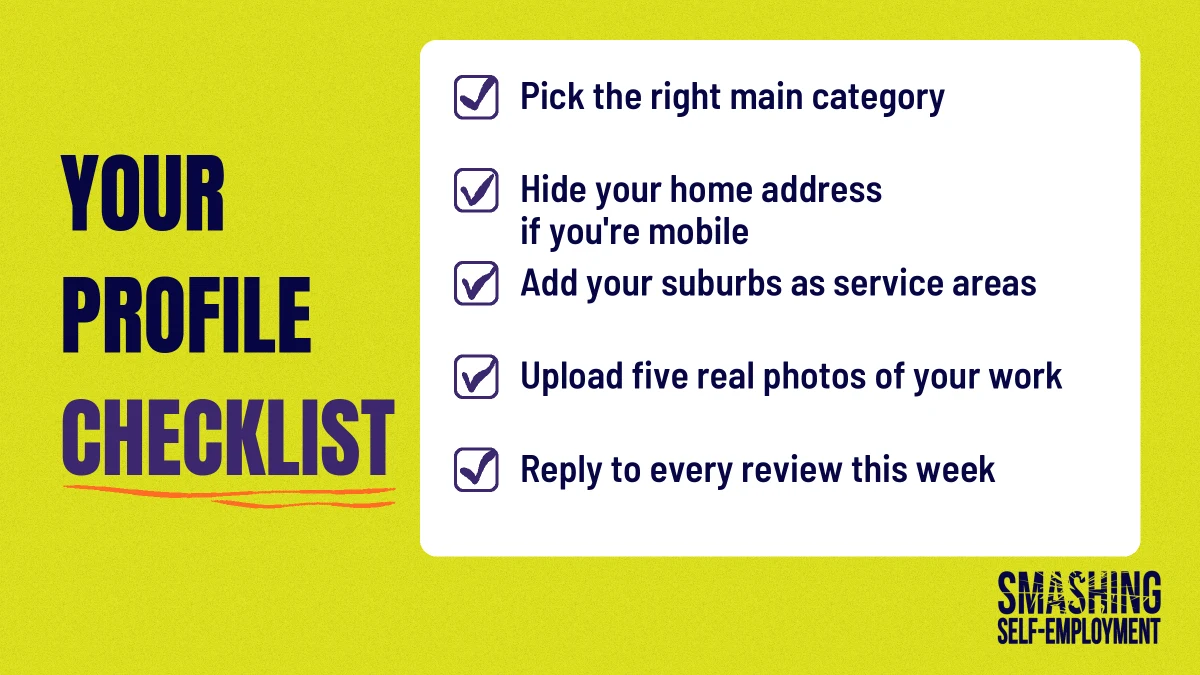
- If you work from home and travel to customers, hide your address and list the suburbs or areas you serve instead.
- Google ranks local profiles on relevance, distance and prominence, so complete details and steady reviews matter most.
- Fifteen minutes a week (a new photo, a review reply, updated holiday hours) keeps your profile working for you.
If you run a small business in Australia, your Google Business Profile is probably the best free marketing tool you’ve got, and most people barely use it. They rush through the boxes once and never look at it again. Learning to set up Google Business Profile in Australia properly is one of the most useful hours you’ll spend this month.
In this post, I’ll show you how to set it up step by step, what to do if you work from home, what actually helps you show up higher, and how to keep it ticking over without it taking over your week.
What a Google Business Profile actually is
It’s the box that pops up on Google Search and Google Maps when someone looks for a business like yours. It shows your phone number, opening hours, reviews, photos and a link to your website.
For a plumber in Geelong or a bookkeeper in Townsville, that box is often where the customer decides whether to call you or the next business down the list. And it costs nothing.
How to set up Google Business Profile in Australia, step by step
Before you start, use a Google account you’ll keep for years. Not a staff member’s personal Gmail, and not one you’ll forget the password to. I can’t stress this enough, because getting locked out of your own profile is a real headache.
- Go to Google Business Profile (search “Google Business Profile” and click Manage now).
- Enter your business name exactly as customers know it. Don’t stuff extra keywords in, like “Smith Electrical Best Electrician Perth”. It looks spammy and can get you into trouble with Google.
- Choose your main category carefully. This is the single biggest clue you give Google about what you do. Pick the most specific one that fits, such as “Electrician” rather than “Contractor”.
- Add your address, or your service area if you visit customers (more on that below).
- Add your phone number and website.
- Verify your business. Google will ask you to prove you’re real, and the method varies, so just follow the prompts.
Once you’re verified, go back in and fill out everything else: hours, services, a short description and photos. Most people stop at verification. Don’t be most people.
Working from home? Hide your address
Now, here’s the thing a lot of tradies, cleaners and mobile businesses get wrong. If customers don’t come to you, Google doesn’t want your home address on show either.
Google calls you a service-area business, which simply means you visit or deliver to customers rather than having them come to you. Google’s help page on service areas says you can list up to 20 service areas based on cities, postcodes or other areas you serve, and that you should remove your address if you don’t serve customers there.
So a mobile dog groomer in Brisbane might list suburbs like Paddington, Toowong and Indooroopilly. Be honest and specific. Listing the whole of Queensland won’t fool anyone, least of all Google.
If you’ve got a shopfront and also travel to customers, you’re a hybrid business. You can show your address and add service areas too.
What actually helps you show up higher
Google is refreshingly open about this one. According to Google’s own guide to local ranking, results are mainly based on three things:
- Relevance: how well your profile matches what someone searched for.
- Distance: how close you are to the person searching.
- Prominence: how well-known your business is, including your reviews and the websites that link to you.
The same page says there’s no way to pay for a better local ranking. That’s good news for small businesses, because it means effort counts more than budget.
You can’t change distance. But you can work on the other two. Fill in every field, add your services with plain descriptions, and keep your hours accurate. To be honest, a complete profile does more for you than a clever one.
Read next: Sole Trader Marketing in New Zealand on Almost No Budget
Reviews: ask for them and answer them
Reviews feed straight into prominence, and they’re what customers read before they ring you. The trick is simply asking. Most happy customers are glad to help, they just don’t think of it.
Send a short text with your review link after a job’s finished, while they’re still pleased. Then reply to every review, good or bad. A calm, polite reply to a grumpy review often impresses future customers more than a row of five stars.
Here’s a real example. Not long ago, I set up a simple review request automation for an electrical company near Hamilton in NZ. Every time they sent an invoice through Xero, their accounting software, the customer automatically got a short email asking for a review, with a direct link to their Google Business Profile review page.
Nobody had to remember to ask. The requests just went out, job after job. In a really short time they’d picked up loads of new reviews, and their profile shot up the local rankings.
The lesson? Tie your review request to something you already do for every customer, like sending an invoice. That way it never gets forgotten.
Keep it ticking over in 15 minutes a week
Your profile isn’t a set-and-forget job. Block out 15 minutes on a Friday and pick one thing: add a real photo of recent work, reply to new reviews, or post a quick update about a service.
Don’t forget special hours for public holidays like Australia Day or Anzac Day. Nothing annoys a customer more than driving to a closed door that Google said was open.
Your profile works best alongside a decent website and some basic search engine optimisation (SEO, which just means helping Google understand and trust your site). If you’d like a hand with the bigger picture, have a look at how I help with SEO for small businesses.
Read next: Marketing Tips for Time-Poor NZ Business Owners
Frequently asked questions
Does a Google Business Profile cost anything?
No, it’s free to create and manage. Google also says you can’t pay for a better local ranking, so the work you put into your profile is what counts.
Do I need a website to have a Google Business Profile?
No, you can have a profile without one. That said, a simple website gives customers more reasons to trust you and helps Google understand what you do.
Can I have a profile if I work from home?
Yes. Set yourself up as a service-area business, hide your home address and list the suburbs or postcodes you actually serve, up to 20 of them.
How often should I update my profile?
A little and often works best. A new photo or review reply each week, plus checking your hours before public holidays, is plenty for most small businesses.
This week, open your Google Business Profile, check your main category and service areas are right, and add one photo of a recent job. That’s it. Just make a start.
And remember, do a little marketing every day. Being consistent is the key to marketing success.
If you’d like a hand setting up your Google Business Profile (or an automation to ask for reviews), email me at help@smashingselfemployment.com and I’ll point you in the right direction.