Key takeaways
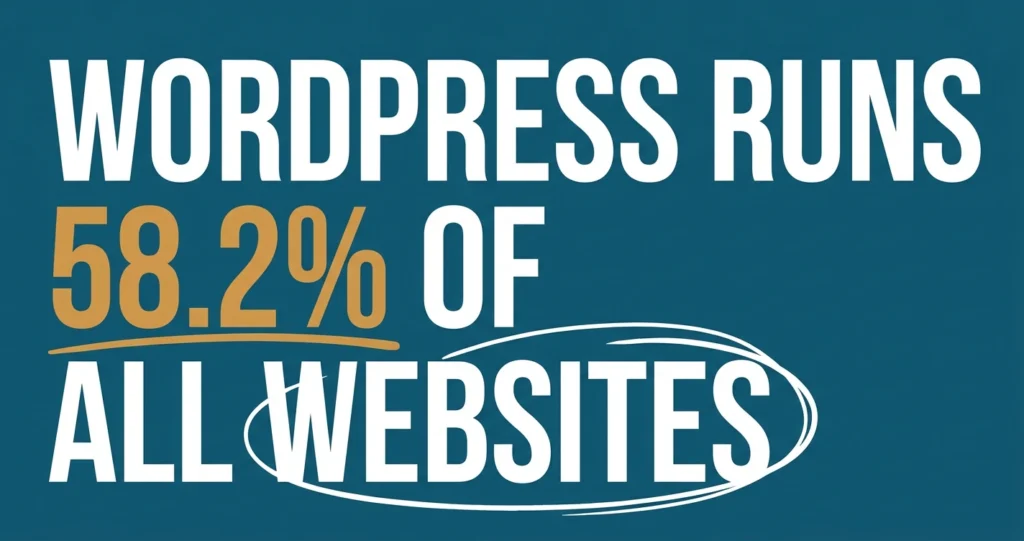
- WordPress runs about 58.2% of all sites with a known content management system (W3Techs, 2026), so you’ll never be short of help or add-ons.
- You own your WordPress site outright, which beats renting space on a closed website builder you can’t take with you.
- Budget for hosting, a decent theme and a little ongoing support, because a WordPress site needs updates to stay secure.
- If your service business expects to grow, book online or add features over time, WordPress gives you room to move.
If you’re weighing up WordPress website design in NZ against the drag-and-drop builders, my honest view is that WordPress is the safer long-term bet for most service businesses. It costs a little more effort to set up, but you own it, you can grow with it, and you’re never locked into one company.
In this article I’ll walk you through what WordPress actually is, how it compares to the builders, what it costs to run, how to keep it secure, and how to decide if it’s right for you.
I’ve built and fixed a lot of small business sites over the years, and WordPress is the platform I come back to again and again. So let’s have a proper look at why.
What WordPress website design in NZ actually means
WordPress is free, open-source software that runs your website. It powers roughly 58.2% of all the websites whose content management system we can identify (W3Techs, 2026), which makes it the most popular way to build a site by a long way.
Now, here’s the thing that trips people up. There are two WordPresses. There’s WordPress.com, which is a hosted service, and there’s WordPress.org, the free software you install on your own hosting. When I talk about WordPress being a solid choice, I mean the self-hosted.org version. That’s the one that gives you real control.
Why do so many small firms use it? Because it does nearly everything. You can run a simple five-page site for your plumbing business, or a booking system for your clinic, or an online shop. The same tool scales up as you do, and almost any web person you hire will already know it.
The pros and cons compared with website builders
The big win with WordPress over a builder like a closed drag-and-drop platform is ownership. You own the site, the files and the content, and you can move it to a new host whenever you like. With most builders, you’re renting. Stop paying and your site disappears, and you often can’t take it with you.
That ownership matters more than people think. One of my clients learned this the hard way. She got into a billing dispute with one of the big-name website builders after they invoiced her for something she wasn’t using. She challenged the charge, but because the bill remained unpaid, they shut down her website, even though they knew it was in dispute.
That’s the risk with these platforms: you don’t really own your site, you rent it. If you and your provider fall out, they can take your website offline while the argument is still going on, and you may have nowhere to move it.
WordPress also wins on flexibility. There’s a plugin for almost anything, with the WordPress.org directory holding close to 60,000 free plugins (WPBeginner, 2026). Need online bookings, a contact form, a newsletter signup or a shop? There’s a tool for that, usually free to start.
Builders do have real advantages, and I won’t pretend otherwise. They’re quicker to get live, there’s nothing to update, and the hosting and security are handled for you. For a very simple site that’ll never change much, a builder can be perfectly fine.

So the trade-off is this. Builders are easier but limited and rented. WordPress takes a bit more care but gives you freedom and room to grow. For a service business that plans to be around in five years, I lean towards WordPress nearly every time.
If you’re still working out your overall approach, it’s worth reading How to Choose a Marketing Agency for Your Small Business before you commit to any platform or provider.
Keeping a WordPress site secure and up to date
This is the part people worry about, and it’s fair. Because WordPress is so popular, it gets poked at a lot. But keeping a site secure is mostly about good habits, not technical wizardry.
The core job is simple: keep things updated. WordPress itself, your theme and your plugins all release updates, and most fix security holes. Letting them pile up is how sites get hacked. Modern WordPress can apply many updates automatically, which takes the pressure off.
A few more basics will cover most of your risk. Use strong passwords and two-factor login. Only install plugins you actually need from reputable sources, and delete any you’ve stopped using. Pick a host that does automatic backups, so if something goes wrong you can roll back.
To be honest, this is the one area where a bit of paid support earns its keep. A small monthly care plan that handles updates, backups and security checks means you can get on with running your business. That’s exactly the kind of thing we handle for clients at Smashing Self-Employment, so you’re not lying awake wondering if your site’s been updated.
Costs to expect for hosting, themes and support
Let’s talk money, because that’s usually the real question. A WordPress site has three cost buckets: hosting, your theme or design, and ongoing support.
Hosting is what you pay to keep your site online. For a small service business you can expect to pay a modest monthly fee, often somewhere between NZ$15 and NZ$60 a month for decent shared hosting. Cheaper exists, but slow hosting costs you visitors, so don’t scrape the bottom.
Themes control how your site looks. There are thousands of free themes, and plenty of good paid ones for a one-off fee, typically under a couple of hundred dollars. Many businesses start free and upgrade later.
Then there’s build and support. You can build it yourself for the cost of your time, or hire someone to design it properly. For a full picture of what a professional build runs to, have a look at How Much Does a Website Cost in NZ? 2026 Prices. The short version: you can start lean and add as you earn.
Compared with a builder’s monthly subscription, WordPress can work out cheaper over a few years, especially once you factor in that you’re not locked into one company’s pricing.
How to decide if it’s right for your service business
Here’s a simple way to decide. Ask yourself whether you expect your website to do more over time. If the answer is yes, WordPress is almost certainly the right call.
Choose WordPress if you want to own your site outright, if you might add bookings, a shop or a members area later, or if you want the freedom to change hosts and web people without rebuilding from scratch. It suits tradies, clinics, consultants, accountants and most growing service businesses in New Zealand, Australia and the Pacific.
A builder might suit you better if you genuinely need a one-page site that’ll never change, you’re not confident with any tech at all, and you’d rather pay a monthly fee to never think about it. That’s a legitimate choice, just go in knowing you’re renting.
If you’re mostly chasing local customers, remember your platform matters less than how well you show up in local search. A lovely site nobody can find won’t bring you work, so make getting found a priority whatever you build on.
For most owners I talk to, WordPress wins because it grows with the business instead of boxing it in. You’re building an asset you control, not borrowing one.
Frequently Asked Questions
Is WordPress good for a small service business in NZ?
Yes, for most. WordPress powers about 58.2% of sites with a known content system (W3Techs, 2026), so support and tools are everywhere. It suits tradies, clinics, consultants and accountants who want a site they own and can grow over time.
Is WordPress free?
The WordPress.org software is free and open-source. You still pay for hosting (often NZ$15 to NZ$60 a month), and optionally for a paid theme, premium plugins or professional design and support. So it’s free to start, but running a proper site has modest ongoing costs.
Is WordPress secure?
It can be very secure with good habits. Keep WordPress, your theme and plugins updated, use strong passwords and two-factor login, install only trusted plugins, and choose a host with automatic backups. A small monthly care plan handles this for you if you’d rather not.
WordPress or a website builder?
Choose WordPress if you want to own your site and expect it to grow, add bookings or a shop. Choose a builder for a very simple site you’ll never change. The main trade-off is ownership and flexibility with WordPress versus convenience and lock-in with a builder.
This week, pick one page of your current site (or a sheet of paper) and write down three things you’ll want your website to do in the next two years. That single list will tell you whether a builder or WordPress fits.
And remember, do a little marketing every day. Being consistent is the key to marketing success.
If you’d like a hand choosing a platform or building a WordPress site that grows with your business, get in touch at help@smashingselfemployment.com.