Key takeaways
- A spreadsheet is a great place to start, but it can’t remind you to follow up, and that’s where work quietly slips away.
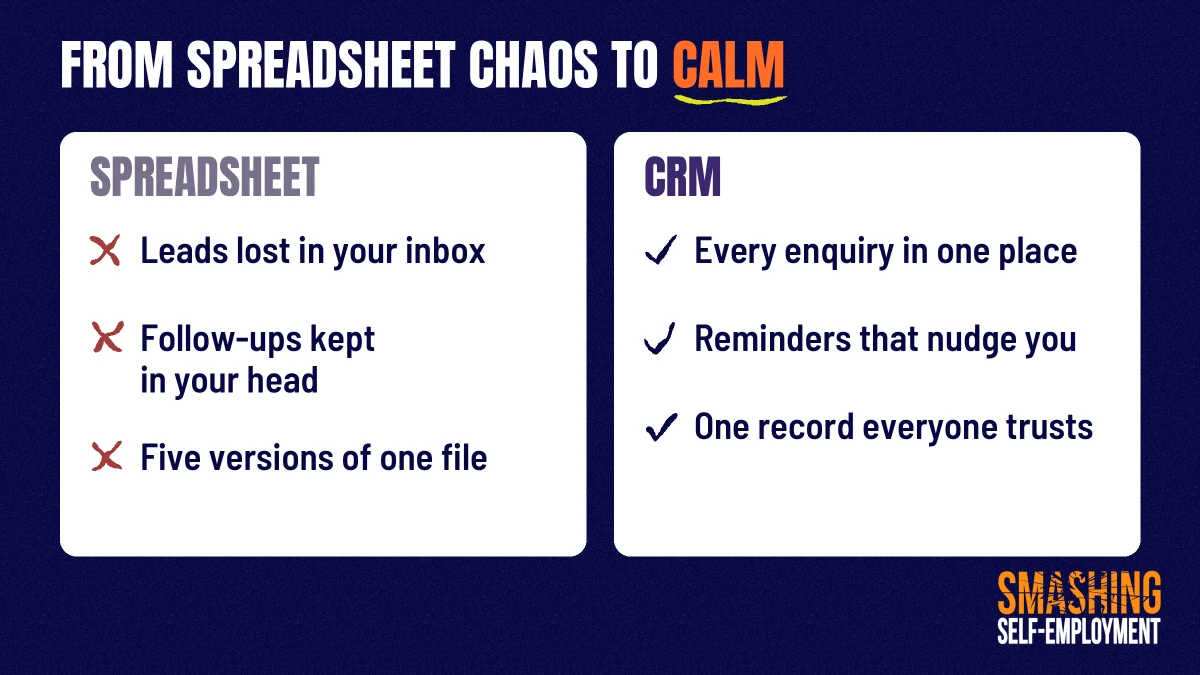
- You’ve probably outgrown it if you’re missing follow-ups, juggling several versions of the file or searching your inbox for client details.
- Tidy your data before you import it, keep your pipeline to four or five stages and only bring across what you actually use.
- Free CRMs like HubSpot and Zoho are enough for most sole traders and small teams to get started this week.
Switching from spreadsheets to a CRM is one of the most useful upgrades a service business can make, and it’s far less painful than most people expect. If you’ve been running your enquiries, quotes and clients out of an Excel file or Google Sheet, you haven’t done anything wrong. You’ve just reached the point where the spreadsheet is starting to cost you work.
In this article, I’ll show you how to tell when it’s time to switch, what a CRM actually does that your spreadsheet can’t, and a simple way to make the move without losing a week of your life.
Signs you’ve outgrown your spreadsheet
Spreadsheets are brilliant when you’ve got a handful of clients. They’re free, familiar and flexible. The trouble starts when the business grows a little.
Here’s the thing. A spreadsheet only knows what you type into it, and it never taps you on the shoulder. So if a quote goes out on Monday and you forget to chase it, nothing happens. The lead just goes cold.
Other signs to watch for: you’ve got “Clients FINAL v3” and “Clients FINAL v4” saved in different places, someone else in the team can’t find the latest notes, or you’re scrolling through emails to remember what a customer asked for last time. If two or three of those sound familiar, it’s time.
What a CRM does that a spreadsheet can’t
CRM stands for customer relationship management. In plain English, it’s a shared address book that also remembers every conversation, shows where each job is up to and reminds you what to do next.
The big difference is the pipeline. That’s simply a visual board showing every enquiry as a card, moving through stages like “New enquiry”, “Quote sent”, “Won” and “Lost”. At a glance, you can see how much work is coming and which quotes need a nudge.
A CRM also logs emails automatically, sets follow-up reminders and lets the whole team see the same up-to-date record. Many connect with Xero too, so your sales and invoicing aren’t living in two separate worlds.
Read next: Best CRM for Small Businesses in NZ and Australia (2026)
Switching from spreadsheets to a CRM, step by step
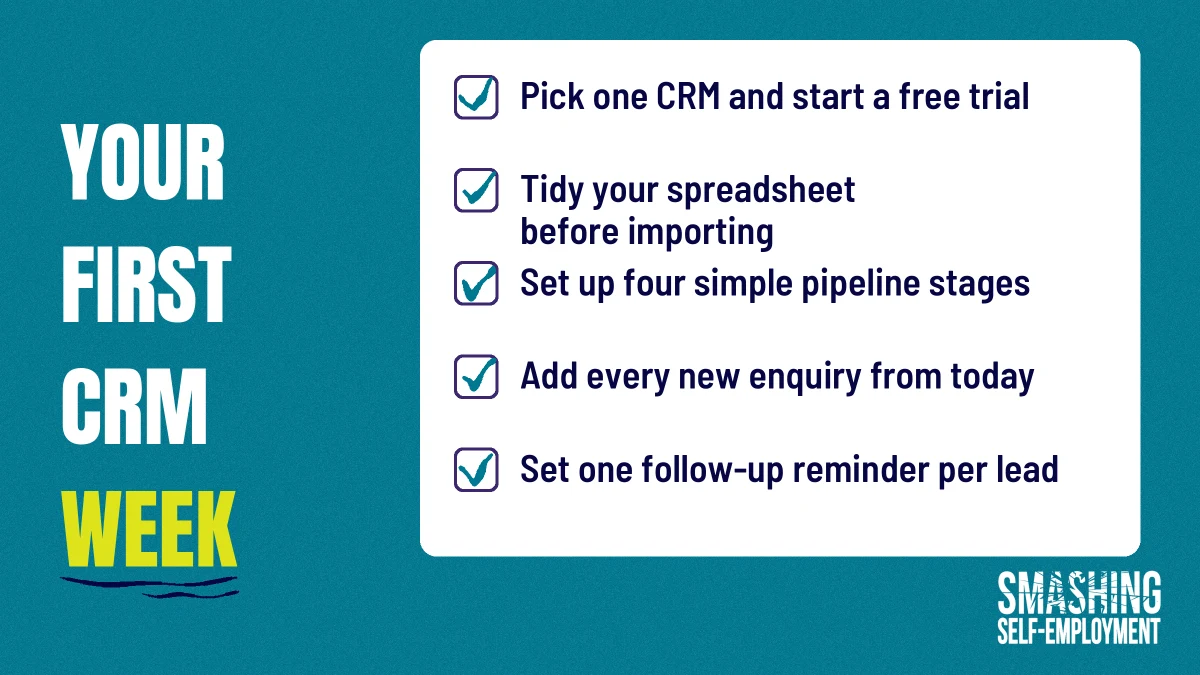
First, pick one CRM and start a free trial. Don’t spend three weeks comparing features. HubSpot’s free CRM and Zoho CRM both have free options that suit most sole traders and small teams, and you can always change later.
Next, tidy your spreadsheet before you import anything. Delete duplicates, remove old contacts you’ll never speak to again and make sure names, emails and phone numbers sit in their own columns. Messy data in means messy data out, and it’s much easier to clean up in a spreadsheet than inside a new system.
Then set up your pipeline. Keep it to four or five stages that match how you actually win work. A plumber might use “Enquiry”, “Site visit”, “Quote sent”, “Booked” and “Done”. That’s plenty.
After that, import your contacts. Most CRMs let you upload a CSV file (a simple export from Excel or Google Sheets) and match each column to a field. Bring across your active clients and open quotes first. Old history can wait, or stay in the spreadsheet as an archive.
Finally, start using it for every new enquiry from today. That habit matters more than any clever setting. If you’d like someone to set it up with you, that’s exactly what my CRM setup and marketing automation service is for.
Don’t forget your privacy obligations
Moving to a CRM is a good moment to check how you’re looking after customer information. Under the Privacy Act, the Office of the Privacy Commissioner says organisations must store personal information securely and not keep it longer than they need it.
A spreadsheet emailed around the team, or sitting on an old laptop, is a risk. A CRM with proper logins and user permissions is usually much safer. So use the switch to delete what you no longer need, and turn on two-factor login while you’re at it.
Keep it simple for the first month
To be honest, the biggest mistake I see is trying to do everything on day one. Automated email sequences, lead scoring and fancy dashboards can all wait.
For the first month, just get every enquiry into the CRM, move cards through your pipeline and set a follow-up reminder for each open quote. Once that’s a habit, you can start automating the repetitive bits.
Read next: Marketing Automation for NZ Service Businesses
Frequently asked questions
How long does it take to switch from a spreadsheet to a CRM?
For a sole trader or small team with a few hundred contacts, you can tidy your data, set up a pipeline and import everything in a day or two. Getting into the habit of using it takes a few weeks.
Will I lose my data when I move?
No. Importing copies your data into the CRM and leaves your original spreadsheet untouched. Keep a backup copy anyway, just in case.
Do I need to pay for a CRM?
Not to start with. Free plans from HubSpot and Zoho cover the basics for most small service businesses. You’d usually only pay once you need more users or automation features.
What should I bring across first?
Start with active clients, open quotes and recent enquiries. Those are the people most likely to bring in work over the next few months.
This week, export your current client spreadsheet, spend 30 minutes deleting duplicates and dead contacts, then sign up for one free CRM trial and import what’s left.
And remember, do a little marketing every day. Being consistent is the key to marketing success.
If you’d like a hand moving your clients out of a spreadsheet and into a CRM, email me at help@smashingselfemployment.com and I’ll point you in the right direction.